

The Complete Guide to SEO: How Search Engine Optimization Works
Search Engine Optimization, commonly known as SEO, is the process of improving a website so that search engines can better discover, understand, and present its pages to people who are looking for relevant information, products, services, or solutions.
For a website owner, SEO is not simply about adding keywords to an article or trying to reach the first position on Google. Good SEO connects several areas of a website: useful content, search intent, website structure, technical accessibility, internal linking, page experience, authority, and trust.
Imagine that you publish a detailed article explaining how beginners can improve a WordPress website. The article may be excellent, but it still needs to be discoverable, understandable, and accessible to search engines. At the same time, when someone visits the page, the information should actually answer their question instead of forcing them to search elsewhere.
That is the real purpose of SEO: helping the right people find useful content through organic search.
This guide explains SEO from the ground up and gradually moves into practical implementation. You will learn how search engines discover and process pages, how keywords and search intent work, how on-page and technical SEO fit together, how internal links and backlinks support a website, how local SEO works, how to measure performance, and how to build a sustainable SEO strategy.
What Is SEO?
SEO stands for Search Engine Optimization. It refers to the practices used to make a website and its content easier for search engines to discover, understand, and potentially show in relevant search results.
SEO also has another important side: understanding the people who use search engines. A page should not be optimized only for search engines. It should be created to satisfy the reason a person searched for a particular topic in the first place.
For example, someone searching for “what is SEO” is probably looking for an explanation. Someone searching for “best SEO tools for WordPress” may be comparing options. Someone searching for “SEO consultant near me” has a much stronger local and commercial intent.
These searches are related, but the users do not necessarily need the same type of page.
This is why effective SEO begins with relevance rather than keywords alone.
A Simple SEO Example
Suppose you own a website about digital marketing and publish an article called “How Search Engine Optimization Works”.
Simply publishing the article does not automatically guarantee strong visibility. You would need to make sure that:
- The page can be accessed by search engine crawlers.
- The main topic is clear from the title and content.
- The article satisfies the reader’s search intent.
- The content is useful and sufficiently original.
- The page has a logical URL and heading structure.
- Related pages can be reached through useful internal links.
- Images are properly described where appropriate.
- The website works well on mobile devices.
- The page does not contain unnecessary technical barriers to indexing.
- The website provides a trustworthy overall experience.
None of these actions guarantees a particular ranking position. SEO improves the conditions under which a page can be discovered, understood, and considered for relevant searches.
How Do Search Engines Work?

Before learning how to optimize a website, it helps to understand what search engines actually do.
Google describes Search as a process involving three major stages: crawling, indexing, and serving search results. Not every page necessarily passes through all stages or appears in search results.
Crawling
Crawling is the process through which search engine systems discover and access web pages.
Search engines do not have a simple central list containing every page on the internet. Instead, automated systems discover URLs through different methods, including links from pages that are already known and submitted sitemaps.
For example, imagine that your website has a category page about SEO. That category page links to a new article called “How to Perform Keyword Research.” A crawler that discovers the category page may follow that link and discover the new article.
This is one reason website structure and internal linking matter.
A page that is isolated from the rest of a website can be harder for search engines to discover compared with a useful page that is naturally connected to relevant sections of the site.
Crawling is not the same as ranking. A search engine may successfully access a page without deciding that the page deserves to appear prominently for a particular query.
Indexing
After a page is crawled, the search engine needs to analyze and understand its content. This process is commonly referred to as indexing.
During indexing, systems can process information such as the text on the page, important HTML elements, images, videos, and other signals that help describe the page.
Search engines may also identify duplicate or substantially similar pages and select a canonical version to represent a group of similar URLs.
This is important because having a page published on the internet does not automatically mean that it will appear in Google’s index.
For example, a page might be accessible to visitors but contain technical settings that discourage indexing. Another page might be extremely thin or provide little unique value. Technical accessibility and content quality therefore work together.
Serving Search Results
When someone enters a query, the search engine searches its index and determines which results are most relevant and useful for that particular query.
The results can vary depending on the query and context. A search for a nearby restaurant can produce local results, while a search for a product may produce image or shopping-related features. An informational query may produce articles, videos, definitions, or other content formats.
This means that SEO is not simply a competition for one universal ranking position.
The goal is to create a page that is genuinely useful for a specific topic and audience, while making it easy for search engines to understand what the page provides.
Why SEO Matters for a Website
Search engines are one of the ways people discover websites they do not already know. If your pages are relevant to questions that people search for, organic search can become an important source of qualified visitors.
SEO can be especially valuable for informational websites because a useful article can continue attracting visitors after it has been published.
However, SEO should not be treated as a guaranteed traffic machine.
Search demand changes. Competitors publish new content. Search results evolve. Websites can gain or lose visibility. Some topics have significant demand while others have very little.
A better way to think about SEO is as a long-term system for improving discoverability and usefulness.
SEO Can Support Different Business Goals
Depending on the website, SEO can support different objectives.
- Traffic: Attract relevant visitors through organic search.
- Awareness: Help people discover a brand or publication.
- Leads: Connect users with services, forms, consultations, or other conversion paths.
- Sales: Help potential customers discover product and category pages.
- Education: Answer questions and build a useful information resource.
- Local discovery: Help people find businesses, services, and locations.
The important word is relevant.
One thousand visitors who have no interest in what your website provides may be less valuable than a much smaller number of visitors who are actively looking for the information, service, or product you offer.
The Main Types of SEO
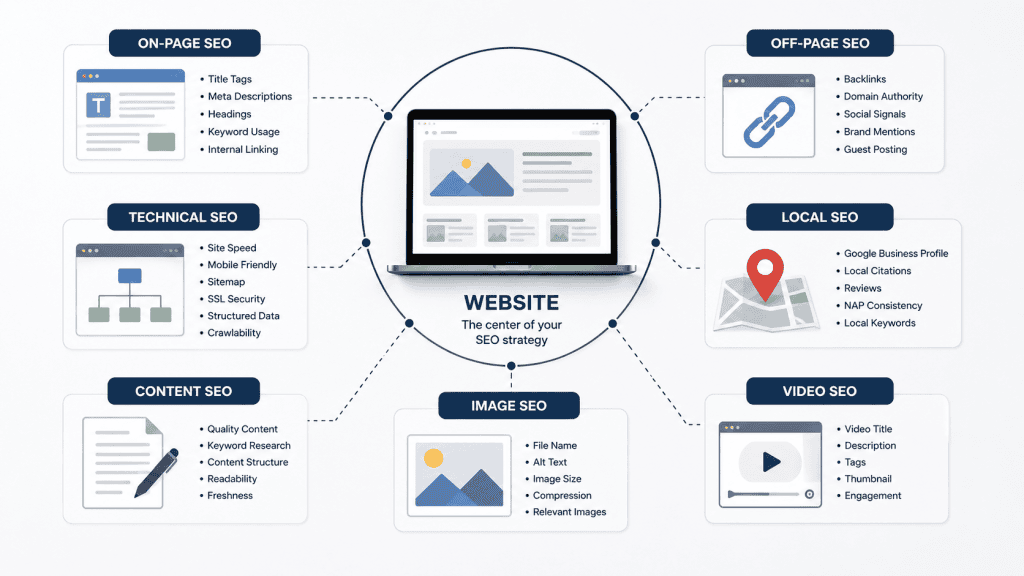
SEO is often divided into several categories. These categories overlap, but they are useful for understanding the different parts of optimization.
On-Page SEO
On-page SEO focuses on elements that exist on the page itself.
This includes the content, title, headings, URLs, internal links, images, descriptive text, and overall organization of information.
A well-optimized page makes its subject clear without repeatedly forcing the same keyword into every paragraph.
For example, an article about keyword research should clearly explain keyword research. It should not repeat the phrase “keyword research” unnaturally dozens of times simply because someone believes a certain keyword density is required.
Technical SEO
Technical SEO focuses on the technical aspects that help search engines access, process, and understand a website.
Examples include:
- Crawl accessibility
- Indexing controls
- XML sitemaps
- Canonical URLs
- Website structure
- Mobile usability
- Page performance
- HTTPS
- Redirect management
- Structured data where appropriate
Technical SEO does not mean that every website needs a complicated technical setup. Google notes that there are relatively few technical requirements for a page to be eligible for Search, and many websites already meet the basic requirements without realizing it.
The practical goal is to remove unnecessary technical obstacles rather than adding complexity for its own sake.
Off-Page SEO
Off-page SEO refers to activities and signals that occur outside the individual page or website itself.
One of the best-known areas is link building.
When another website links to your page, that link can help people discover your content and may contribute to how search engines understand the relationships and reputation surrounding websites.
However, not every backlink is equally useful.
A relevant, naturally earned link from a trustworthy website can be much more meaningful than a large collection of random links created only to manipulate rankings.
Local SEO
Local SEO focuses on helping businesses become visible for searches connected to a specific geographic area.
For example, a person searching for “digital marketing agency in Delhi” has a different need from someone searching for “what is digital marketing”.
Local SEO can involve accurate business information, a well-maintained Google Business Profile, relevant local content, reviews handled appropriately, location information, and a website that clearly explains what the business offers.
Content SEO
Content SEO focuses on creating and improving useful content around topics that matter to the intended audience.
It includes understanding what people are searching for, identifying the questions behind those searches, organizing information clearly, covering a topic to an appropriate depth, and keeping important content accurate.
A strong content strategy does not require publishing articles every day.
It is usually better to create a smaller collection of genuinely useful resources than to publish large quantities of shallow pages that exist mainly to attract search traffic.
Image and Video SEO
Images and videos can also contribute to how people discover and understand content.
For images, useful practices include descriptive file names, appropriate alternative text, suitable image formats, reasonable file sizes, and placing images where they genuinely help the reader.
For videos, clear titles, descriptions, useful supporting content, and a good viewing experience can make the content easier for users to understand and discover.
Neither image SEO nor video SEO should be treated as an excuse to add unnecessary media to every page. Media should serve a purpose.
SEO Is a System, Not a Single Trick
One of the biggest misunderstandings about SEO is that there is one secret technique that can make a website rank.
In reality, SEO is a collection of connected practices.
Consider a simple example. You create an excellent article, but the page is accidentally blocked from crawling. The content quality does not solve that technical problem.
Now consider the opposite situation: your website is technically perfect, but the article does not answer the reader’s question. Technical optimization alone cannot make weak content genuinely useful.
The strongest approach combines both sides.
- Make the content useful.
- Understand the audience and search intent.
- Make the page accessible to search engines.
- Organize information clearly.
- Connect related pages logically.
- Build credibility naturally.
- Measure performance.
- Improve the website over time.
This people-first approach is consistent with Google’s current guidance, which emphasizes helpful, reliable content created primarily to benefit people rather than content produced mainly to manipulate search rankings.
That principle should remain at the center of every SEO decision made on a website.
What SEO Cannot Guarantee
SEO is sometimes marketed as if following a checklist guarantees a first-place ranking. That is not how organic search works.
Search engines use automated systems to evaluate huge numbers of pages and determine which results are most relevant for individual queries. Google explicitly states that following its technical requirements does not guarantee indexing or a particular search position.
For that reason, a responsible SEO strategy should focus on improving the quality, accessibility, relevance, and usefulness of a website rather than promising a specific ranking.
The right question is not:
“What trick will make this page rank first?”
A better question is:
“How can I make this page the most useful and understandable resource for the people searching for this topic?”
That change in mindset makes the rest of SEO much easier to understand.
Keyword Research and Search Intent
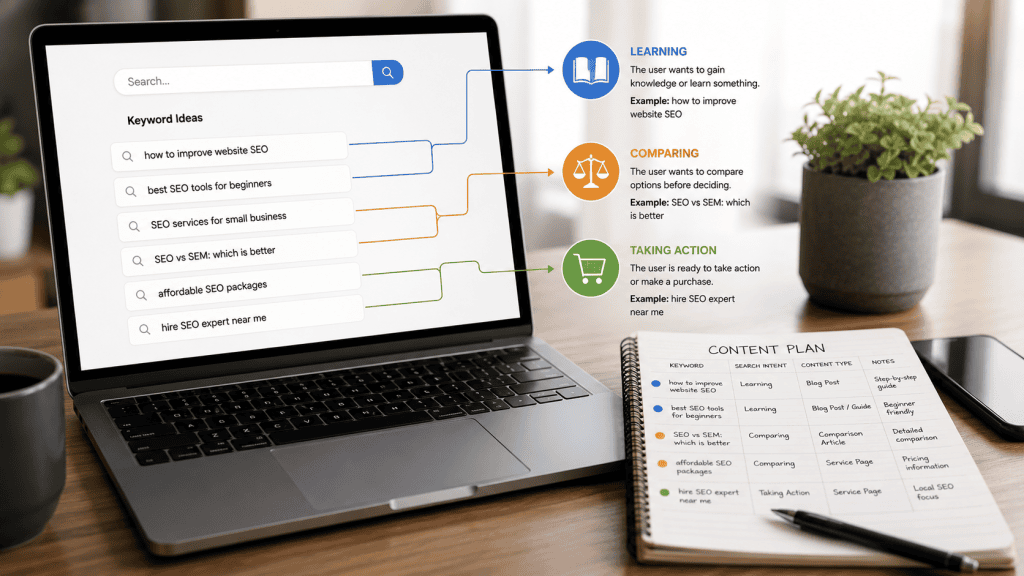
Once you understand the basic purpose of SEO, the next step is understanding what people actually search for.
This is where keyword research and search intent become important. Instead of creating content based only on what you think people might want, keyword research helps you identify the language people use when looking for information, products, services, or solutions.
However, keyword research is not simply about collecting a long list of phrases. The more useful approach is to understand the problem behind each search and then decide what type of content can genuinely satisfy it.
What Is Keyword Research?
Keyword research is the process of discovering and evaluating search terms that are relevant to your website, audience, products, services, or content.
For example, a website about SEO might identify searches such as:
- What is SEO?
- How does SEO work?
- How to do SEO for a website
- SEO tips for beginners
- Keyword research tools
- Technical SEO checklist
These phrases are related, but they do not necessarily represent the same need.
Someone searching for “what is SEO?” is probably at the beginning of the learning process. Someone searching for “technical SEO checklist” may already understand the basics and want something practical.
This difference should influence the content you create.
Do Not Choose Keywords Only by Search Volume
Search volume can be useful when researching topics, but it should not be the only factor you consider.
A keyword with a large amount of search demand may also have intense competition or may not match what your website provides.
For a new website, a highly specific topic can sometimes be more useful than trying to compete immediately for a broad term.
For example, a small website may have little reason to create a generic page targeting a very broad phrase such as “SEO” if its actual audience is looking for beginner-friendly WordPress SEO tutorials.
A more focused topic such as “SEO basics for a new WordPress website” can provide a clearer content direction.
The goal is not to find the biggest keyword. The goal is to find topics that are relevant, useful, realistic for your website, and aligned with what your audience actually needs.
What Is Search Intent?
Search intent is the reason behind a search query.
Two searches can contain similar words while representing completely different expectations.
Understanding intent helps you decide what kind of page should be created for a query.
Informational Intent
Informational searches are usually made by people who want to learn something or find an answer.
Examples include:
- What is technical SEO?
- How does Google Search work?
- How to create an XML sitemap?
- What is a canonical URL?
For these searches, a helpful guide, tutorial, explanation, or educational article may be appropriate.
Commercial Investigation Intent
Commercial investigation searches usually happen when someone is comparing options before making a decision.
Examples include:
- Best SEO tools for beginners
- SEO plugins comparison
- Best website analytics tools
- SEO software features
These users may want comparisons, reviews, feature explanations, advantages and disadvantages, or practical buying considerations.
Transactional Intent
Transactional searches usually indicate that the user is closer to taking an action such as purchasing a product, subscribing to a service, or starting a transaction.
Examples can include:
- Buy SEO software
- SEO audit service
- WordPress SEO service
- Hire SEO consultant
For these searches, a product page, service page, pricing page, or another action-focused page may be more appropriate than a general educational article.
Navigational Intent
Navigational searches are generally performed when people are trying to reach a particular website, company, platform, or page.
For example, a person searching for the name of a specific SEO tool may already know which website they want to visit.
Understanding this distinction prevents a common SEO mistake: creating a long informational article for a search that actually requires a product, service, or official website page.
How to Choose Useful Keywords
Before selecting a keyword, ask a few practical questions:
- Is this topic relevant to my website?
- Does my target audience actually need this information?
- What problem is the searcher trying to solve?
- What type of page would satisfy that need?
- Can my website provide something genuinely useful?
- Is the topic specific enough to create focused content?
- Does the existing search landscape suggest that users expect articles, tools, products, local businesses, or another format?
This approach is more useful than choosing keywords mechanically.
On-Page SEO
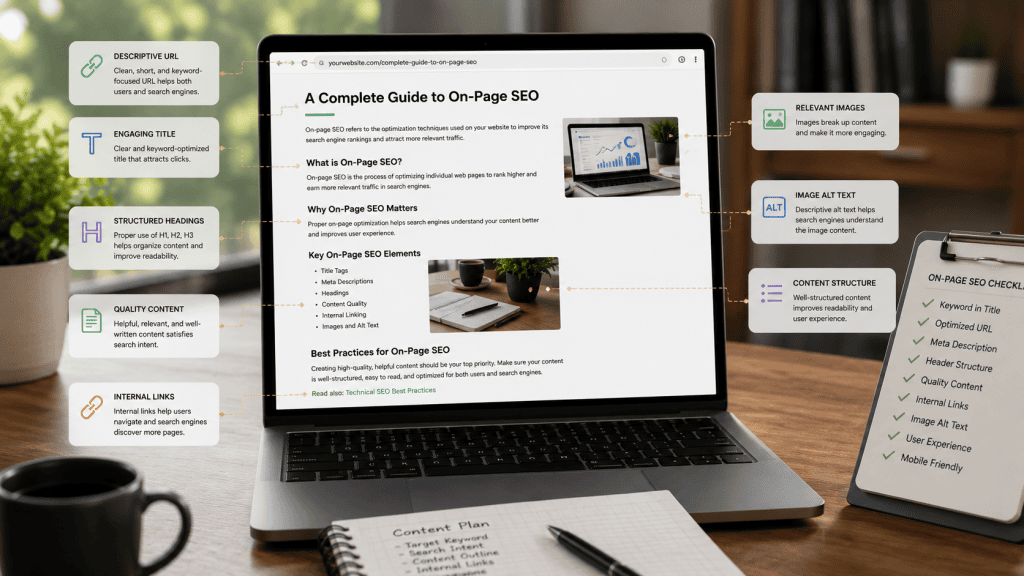
On-page SEO focuses on the content and elements of an individual webpage.
The objective is to make the page clear and useful for visitors while also helping search engines understand the subject and structure of the content.
On-page optimization should feel natural. A page should never become difficult to read because keywords have been inserted into every heading and paragraph.
Titles and Headings
The page title is one of the first pieces of information users and search engines encounter.
A good title should accurately describe the page and give the reader a clear reason to understand what they will find.
For example:
Weak: SEO Guide
Better: The Complete Guide to SEO: How Search Engine Optimization Works
The second title provides considerably more context without needing unnecessary keyword repetition.
Headings inside the article should then organize the information logically.
Use one main H1 for the primary page title. Use H2 headings for major sections and H3 headings for subsections within those sections.
Do not create headings simply because you want to place additional keywords on the page.
A useful heading should help the reader understand what comes next.
Content Optimization
Good content optimization starts with clarity.
The article should answer the main question early enough that readers do not have to navigate through several paragraphs of filler before reaching the useful information.
At the same time, a comprehensive article should not reduce everything to one-line definitions.
For example, explaining “What is a sitemap?” in one sentence may be technically correct, but a beginner may also need to understand why a sitemap exists, what it contains, when it is useful, and how it fits into a website’s overall SEO setup.
Effective content therefore balances simplicity with sufficient context.
Write for the Reader First
One of the most important principles of modern SEO is that content should be created primarily to help people.
Before publishing a page, ask:
Does this page solve the reader’s problem better than a generic definition would?
If the answer is no, adding more keywords will not solve the underlying problem.
Useful content often includes:
- Clear explanations
- Practical examples
- Relevant screenshots or illustrations
- Step-by-step instructions where appropriate
- Useful comparisons
- Warnings about common mistakes
- Links to related resources
- Answers to natural follow-up questions
Not every article needs all of these elements. The format should match the topic.
Use Natural Keyword Placement
Your main topic should naturally appear in important parts of the page when appropriate.
Depending on the page, this can include the title, main heading, introductory content, relevant subheadings, body copy, URL, and image descriptions where they genuinely apply.
However, there is no universal keyword density percentage that every page needs to achieve.
Repeating a keyword simply to reach an artificial percentage can make writing awkward and reduce readability.
For example, this type of sentence is unnecessary:
“SEO helps SEO websites improve SEO performance through SEO strategies for SEO rankings.”
It contains the target term repeatedly, but it communicates very little.
A natural alternative would be:
“A well-planned SEO strategy can improve how easily people discover and understand relevant pages through organic search.”
The second sentence is clearer and still communicates the topic.
URLs
A URL should be understandable and reasonably concise.
For example:
Better: /complete-guide-to-seo/
Less useful: /article-2026-best-complete-seo-guide-for-search-engine-optimization-beginners-and-experts/
A descriptive URL helps communicate what the page is about and is easier for users to read and remember.
There is usually no need to include every possible keyword in a URL.
Keep URLs focused on the main topic.
Internal Linking
Internal links connect one page of your website to another page on the same website.
They are useful for both users and website structure.
Suppose TrendyTechArc has separate articles about:
- Keyword research
- Google Search Console
- Technical SEO
- Internal linking
- Google Ads
A comprehensive SEO guide can naturally link to those more detailed resources when they become relevant.
For example, while explaining keyword research, you might link the words “keyword research” to a dedicated article that teaches the process in greater detail.
This creates a logical relationship between the broad pillar article and more focused supporting articles.
Build a Pillar and Cluster Structure
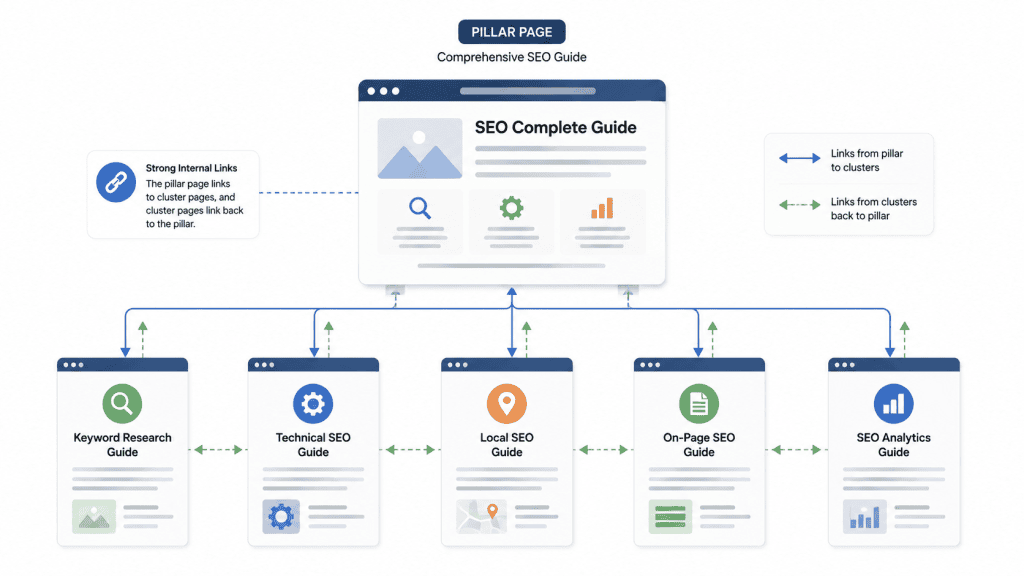
A pillar article covers a broad subject and links to more focused supporting articles.
For example:
- Pillar: The Complete Guide to SEO
- Cluster: Keyword Research Guide
- Cluster: Technical SEO Guide
- Cluster: On-Page SEO Guide
- Cluster: Local SEO Guide
- Cluster: Google Search Console Guide
The pillar article gives readers the overall picture, while cluster articles allow them to explore individual subjects in greater depth.
Do not create cluster articles simply because a content model says you need a certain number of posts. Each supporting article should exist because it answers a useful question that deserves its own page.
Use Descriptive Anchor Text
Anchor text is the clickable text used for a link.
Descriptive anchor text gives readers a better idea of where the link will take them.
For example:
Weak: Click here
Better: Learn how to perform keyword research
The second option provides useful context before the reader clicks.
At the same time, anchor text should remain natural. There is no need to force an exact keyword into every internal link.
Images and On-Page SEO
Images can make educational content easier to understand, especially when explaining workflows, interfaces, comparisons, or visual concepts.
But images should be added because they provide value rather than simply because an article needs a certain number of images.
For a typical long-form guide, useful image opportunities may include:
- A visual explanation of how search engines work
- A keyword research example
- An illustration of internal linking
- A technical SEO workflow
- An analytics dashboard concept
When an image communicates important information, provide appropriate alternative text that describes the image’s purpose.
Alternative Text
Alternative text, commonly called alt text, helps describe an image when the image cannot be viewed and can also support accessibility.
Good alt text should describe the meaningful content or purpose of the image.
For example:
Weak: SEO image
Better: Diagram showing how search engines crawl, index, and serve web pages
Do not fill alt text with a list of keywords.
If an image is purely decorative and provides no meaningful information, it may not need descriptive alt text.
Image File Names
Before uploading an image, use a simple descriptive file name when practical.
For example:
seo-search-engine-process.jpg
is more informative than:
IMG_58392.jpg
File names should describe the image naturally. They do not need to contain every related keyword.
Image Size and Performance
Large image files can increase page weight and may negatively affect loading performance.
Before uploading images to WordPress, resize them to a reasonable display size and use an appropriate modern format where supported.
A blog image that will only appear at around 800 pixels wide does not necessarily need to be uploaded as a massive original camera file.
The objective is simple: maintain visual quality without sending unnecessarily large files to the visitor’s browser.
Creating Content That Matches Search Intent
One of the most useful ways to improve an article is to compare the content with the question the reader actually asked.
Imagine someone searches for:
“How to create an XML sitemap in WordPress.”
An article that spends most of its space defining SEO and barely explains sitemap creation does not satisfy the search intent very well.
A better page would quickly establish what an XML sitemap is and then focus on the actual WordPress process.
The same principle applies to commercial searches.
If someone searches for “best SEO plugin for WordPress”, a page containing only a definition of SEO plugins is unlikely to satisfy the user’s comparison intent.
The content may need to discuss relevant features, limitations, suitability for different users, and practical differences between available options.
Search intent therefore influences not only keywords but also the structure, depth, and format of the page.
How to Optimize a Page Without Over-Optimizing It
Over-optimization happens when SEO techniques become more important than the actual reader experience.
A page can contain the correct keyword in the title, headings, URL, image alt text, and body copy and still be a poor result if the content is repetitive, shallow, misleading, or difficult to use.
A better workflow is:
- Identify the main topic.
- Understand the audience.
- Determine the likely search intent.
- Plan the information the reader actually needs.
- Create the content naturally.
- Organize it with clear headings.
- Add relevant internal links.
- Optimize images where useful.
- Review the page for clarity and unnecessary repetition.
- Publish and monitor how the page performs.
This process keeps optimization connected to usefulness.
A Practical On-Page SEO Review
Before publishing an article, review the page from a reader’s perspective.
- Does the title accurately describe the page?
- Does the introduction quickly establish what the reader will learn?
- Are the headings logical?
- Does each section answer a useful question?
- Is the primary topic covered naturally?
- Are related concepts explained without unnecessary repetition?
- Are URLs short and descriptive?
- Are internal links genuinely useful?
- Does anchor text describe the linked destination?
- Do images improve understanding?
- Is important image content described appropriately?
- Are image files reasonably optimized?
- Does the article work comfortably on a mobile screen?
If the answer to these questions is mostly yes, the page is already following a much stronger optimization process than one based on keyword repetition alone.
Technical SEO

Technical SEO is the part of search engine optimization that focuses on how easily search engines and users can access, process, and navigate a website.
The word “technical” can make SEO sound complicated, but most websites do not need an advanced technical setup to become search-friendly. The practical goal is to make sure that important pages are accessible, understandable, indexable when appropriate, and technically sound.
Technical SEO becomes especially important as a website grows. A small website with ten carefully organized pages has fewer technical challenges than a large website with thousands of URLs, filters, categories, redirects, duplicate pages, images, and other content types.
For a beginner, the best approach is to understand the fundamentals first instead of trying to change every technical setting available.
Crawling and Indexing
Search engines need to discover and access your pages before those pages can potentially appear in search results.
This makes crawlability an important part of technical SEO.
A crawlable website should allow search engine crawlers to access the pages that are intended to be discovered. Internal links are one way crawlers can discover related URLs, while XML sitemaps can provide search engines with information about important URLs on a website.
However, crawling does not guarantee indexing.
A page can be successfully crawled and still not appear in search results. Indexing and ranking are separate processes.
For example, imagine that you publish a new article and link to it from your homepage. A crawler may discover the article through that link. If the page is technically accessible and suitable for indexing, it may then be processed and considered for inclusion in the search index.
This is why simply submitting a URL somewhere is not a substitute for having a well-structured website.
XML Sitemaps
An XML sitemap is a file that provides search engines with information about URLs that you want them to know about on your website.
For many WordPress websites, SEO plugins or other website systems can generate and maintain sitemaps automatically.
A sitemap can be particularly useful when:
- Your website contains many pages.
- You have recently launched a new website.
- Your website contains pages that are not easily discovered through internal links.
- You frequently publish new content.
- Your website has a large or complex structure.
A sitemap is not a ranking shortcut, and submitting one does not guarantee that every URL will be crawled or indexed.
Think of a sitemap as a way of communicating useful URL information to search engines rather than as a command that forces Google to index every page.
Robots.txt
The robots.txt file provides rules that can tell compliant crawlers which areas of a website they should not crawl.
It is important to understand what robots.txt does and does not do.
A robots.txt rule can help control crawling, but it should not be treated as a universal method for removing a page from Google’s search results.
If a page should not appear in search results, the appropriate indexing control should be used instead. Google recommends allowing the page to be crawled when using a noindex rule so that the crawler can actually see that instruction.
For beginners, changing robots.txt without understanding the consequences can create unnecessary problems. Accidentally blocking an important section of a website can prevent crawlers from accessing pages that you actually want them to discover.
Before changing robots.txt, understand exactly which URLs the rule affects.
Canonical URLs
A canonical URL is a way of indicating which URL should be considered the preferred version when multiple URLs contain the same or very similar content.
Duplicate or near-duplicate URLs can occur naturally.
For example, an online store may have several URLs that lead to substantially similar product listings because of sorting, filtering, or tracking parameters.
Search engines need to understand which version should generally represent the content.
A canonical link element can provide a signal about the preferred URL.
However, canonicalization should not be treated as a magical command that forces Google to choose a specific URL in every situation. Search engines may use multiple signals when deciding which version to index and show.
For a normal WordPress blog with clean URLs and no unusual duplication, canonical settings are often handled automatically by the site’s SEO or WordPress setup.
Redirects
Redirects tell browsers and search engines that a URL has moved to another location.
They are particularly useful when changing a page URL, restructuring a website, deleting outdated pages, or moving content to a new location.
For permanent page moves, a permanent server-side redirect such as a 301 is commonly used.
For example, suppose an old article uses:
/seo-basics-for-beginners/
and you later move the content to:
/complete-seo-guide/
A proper redirect can send visitors and crawlers from the old URL to the new location instead of leaving them with a broken page.
Redirects should be used carefully. Creating long chains of redirects or repeatedly redirecting one URL through several intermediate URLs can make website management unnecessarily complicated.
404 Errors
A 404 response generally means that a requested page could not be found at that URL.
Not every 404 is a technical disaster.
Pages can legitimately disappear over time, especially when websites are reorganized. The important question is whether the missing URL creates a poor experience or represents a valuable page that should have been redirected or restored.
If an old article has been permanently replaced by a substantially similar new article, a redirect may be appropriate.
If no relevant replacement exists, forcing the old URL to another unrelated page can be confusing for visitors.
Technical SEO is therefore not about eliminating every possible 404. It is about managing URLs in a logical way.
Mobile Experience
A website should work well on mobile devices because a large amount of web activity happens on phones and other small-screen devices.
Mobile optimization includes more than making a page technically responsive.
Visitors should be able to:
- Read the text without excessive zooming.
- Navigate the website comfortably.
- Tap buttons and links without difficulty.
- Use forms without unnecessary friction.
- View important content without horizontal scrolling.
- Understand the page structure on a small screen.
A website can be technically responsive and still provide a poor mobile experience if the text is too small, buttons are difficult to tap, advertisements interrupt the content, or important information is pushed far below the page.
Mobile usability should therefore be evaluated from the user’s perspective rather than simply by checking whether a design technically shrinks to fit the screen.
Website Performance
Website performance affects how quickly visitors can access and interact with a page.
Large images, unnecessary scripts, excessive plugins, heavy page builders, poorly configured hosting, and inefficient third-party resources can all contribute to slower pages.
For a WordPress website, performance improvements often begin with simple decisions:
- Use appropriately sized images.
- Compress media before or during upload.
- Remove plugins that are genuinely unnecessary.
- Avoid excessive visual effects.
- Use a reliable hosting environment.
- Keep themes and plugins updated.
- Reduce unnecessary third-party scripts.
- Monitor real performance instead of relying only on assumptions.
Performance should not be approached as a race to achieve an arbitrary score. The objective is to create a fast, stable, and comfortable experience for real visitors.
Core Web Vitals
Core Web Vitals are a set of metrics used to assess important aspects of real-world page experience, including loading performance, responsiveness, and visual stability.
The main metrics currently associated with Core Web Vitals are:
- Largest Contentful Paint: Measures loading performance.
- Interaction to Next Paint: Measures responsiveness to user interactions.
- Cumulative Layout Shift: Measures visual stability.
These metrics are useful because they move performance discussions beyond simply asking whether a page “feels fast.” They provide measurable indicators that can help website owners identify problems.
However, improving Core Web Vitals should not become an excuse to destroy the design or remove useful functionality. Performance optimization should balance speed, accessibility, usability, and the actual needs of visitors.
HTTPS and Website Security
HTTPS encrypts communication between a visitor’s browser and the website.
For modern websites, HTTPS should be considered a basic security requirement rather than an optional SEO trick.
Visitors should be able to access the website securely, especially when they submit forms, log in, make purchases, or provide other information.
For WordPress websites, make sure that the site consistently uses the secure HTTPS version and that important resources are not unnecessarily loaded over insecure HTTP connections.
Technical SEO for WordPress Websites
WordPress can make many basic SEO tasks easier because modern WordPress setups can provide structured content, clean URLs, feeds, navigation, and other useful foundations.
However, WordPress does not automatically make every website technically perfect.
Problems can still appear because of poorly configured plugins, duplicate pages, unnecessary archives, broken links, incorrect indexing settings, oversized images, poor hosting, or theme-related performance issues.
A practical WordPress SEO workflow should therefore focus on keeping the website simple.
For a small educational website, you usually do not need dozens of SEO plugins performing overlapping functions.
Choose a sensible setup, understand what each tool does, and avoid changing technical settings simply because they exist.
Off-Page SEO and Link Building

Off-page SEO covers activities and signals that exist outside the individual webpage.
One of the most discussed areas is backlinks.
What Are Backlinks?
A backlink is a link from another website to your website.
For example, imagine that a respected technology publication writes an article about beginner SEO resources and naturally links to your guide because it provides useful information.
That is a backlink.
Backlinks can help people discover your website and can provide context about relationships between pages and websites.
But the number of backlinks alone is not a meaningful measure of SEO success.
Ten relevant, editorially earned links can be more valuable from a quality perspective than hundreds of low-quality links created through automated or manipulative methods.
Quality and Relevance Matter
A useful backlink usually makes sense in the context where it appears.
Imagine two websites:
- A technology website links to your technical SEO tutorial because it helps its readers.
- An unrelated website contains hundreds of random links to websites in completely unrelated industries.
The first situation has a much clearer editorial reason for the link to exist.
This is why link building should begin with content that deserves to be referenced.
Create something useful enough that another website, journalist, educator, business, community, or content creator would have a genuine reason to mention it.
Natural Ways to Earn Links
There is no single guaranteed method for earning backlinks, but several legitimate approaches can help.
- Create original research or useful data.
- Publish genuinely comprehensive guides.
- Create practical tools or resources.
- Produce original illustrations or educational graphics.
- Contribute useful expert information to relevant publications.
- Build relationships within your industry or community.
- Promote useful content through legitimate channels.
The key is that the content should have value even without the backlink.
Link Building Mistakes
One of the most common SEO mistakes is treating backlinks as a numbers game.
Some people attempt to create hundreds or thousands of links through automated services, low-quality directories, comment spam, private networks, paid link schemes, or large-scale guest-post campaigns created mainly for ranking manipulation.
These methods can create risk instead of sustainable SEO value.
Google’s current spam policies specifically identify practices such as buying or selling links for ranking purposes, excessive link exchanges, automated link creation, low-quality directory links, keyword-rich manipulative links, and other forms of link spam as violations.
For this reason, a backlink strategy should focus on relevance, editorial value, and genuine usefulness rather than a target such as “build 100 backlinks this month.”
Paid Links and Sponsored Content
Paid relationships are not automatically a problem.
Businesses can legitimately pay for advertising, sponsorships, or promotional placements. The issue arises when paid links are used primarily to manipulate organic search rankings without appropriate qualification.
Google recommends using appropriate link attributes such as rel=”sponsored” for paid or sponsored links. User-generated links may use rel=”ugc”, while rel=”nofollow” can be used in situations where you do not want to associate your site with or pass ranking credit through a link.
The important principle is transparency.
Guest Posting and Link Building
Guest contributions can be useful when they provide real value to another website’s audience.
For example, a digital marketing professional might contribute a genuinely useful article to a respected industry publication because the publication’s audience would benefit from that expertise.
The problem begins when guest posting becomes a mass-production system designed mainly to create backlinks.
Publishing the same or lightly modified article across many websites, stuffing keyword-rich links into articles, or paying for large-scale placements can create a link scheme rather than genuine content promotion.
A good rule is simple: if the article would not be worth publishing without the backlink, reconsider the strategy.
Do You Need Hundreds of Backlinks?
No fixed number of backlinks guarantees success.
The number of links required can vary dramatically depending on the topic, competition, website authority, content quality, search demand, and the type of query.
A local informational article may perform well with very few external links, while a highly competitive commercial topic may have many established websites competing for visibility.
Instead of chasing an arbitrary backlink target, focus on improving the overall website and creating resources that can naturally attract references.
Internal Links vs. Backlinks
Internal links and backlinks are both links, but they serve different purposes.
| Link Type | Where It Comes From | Main Purpose |
|---|---|---|
| Internal Link | Another page on your own website | Help users and crawlers navigate related content |
| Backlink | Another website | Help users discover your site and provide external context |
A strong website should not ignore internal links while focusing entirely on backlinks.
For a growing content website, internal linking is often one of the easiest areas to improve because you control the links yourself.
For example, the SEO pillar article on TrendyTechArc can link to detailed articles about keyword research, Google Search Console, technical SEO, Google Ads, and other relevant subjects.
Those supporting articles can then link back to the pillar article when the broader SEO topic becomes relevant.
How to Build a Sustainable Link Strategy
A sustainable link strategy begins with the content itself.
- Create a useful resource.
- Make the resource easy to understand and share.
- Connect it with relevant pages on your own website.
- Promote it through legitimate channels.
- Reach out only when there is a genuine reason for another publisher to consider it.
- Build relationships rather than sending mass automated link requests.
- Track which content naturally attracts attention and references.
This approach takes more time than buying a package of hundreds of backlinks, but it avoids the fundamental problem of trying to manufacture authority.
SEO and Website Structure Work Together
Technical SEO, on-page SEO, and off-page SEO should not be treated as completely separate systems.
Consider a new article on a website.
The content needs to satisfy the reader’s search intent. The page needs a clear title and structure. The website needs to allow the page to be crawled. Internal links can help users and crawlers discover it. A sitemap can provide another way of communicating important URLs. The article may eventually earn external references because it provides useful information.
Each part supports the larger system.
If the content is poor, technical SEO cannot make it genuinely useful.
If the content is excellent but accidentally blocked from crawling, search engines may have difficulty discovering it.
If the content and technical foundation are strong but the website is filled with manipulative link schemes, the site can still create unnecessary search risks.
Good SEO therefore comes from making many reasonable decisions consistently rather than searching for one shortcut.
Local SEO
Local SEO is the part of search engine optimization that helps businesses become more visible when people search for products, services, or places connected to a specific geographic area.
It is especially important for businesses that serve customers in a particular city, neighborhood, region, or physical location.
For example, someone searching for “SEO agency in Delhi” has a different need from someone searching for “what is SEO”.
The first search has a strong local and commercial element. The second is primarily informational.
Because the intent is different, the SEO strategy should be different as well.
Google Business Profile
For an eligible local business, a Google Business Profile can be an important part of local search visibility.
A properly maintained profile can help customers find useful information about the business, such as its name, location, contact information, opening hours, website, services, and other relevant details.
The information should be accurate and kept up to date.
For example, if a business changes its phone number or operating hours, leaving old information online can create a poor customer experience.
Local SEO is therefore not just about appearing in search results. It is also about giving people reliable information when they are ready to visit or contact a business.
Local Ranking Signals and Relevance
Local search results can depend on factors related to relevance, distance, prominence, and the information available about a business.
A business cannot simply add the name of a city to every paragraph and expect to dominate local search.
Instead, the website should clearly explain:
- What the business does.
- Which products or services it provides.
- Which locations it genuinely serves.
- How customers can contact or visit the business.
- What makes the business relevant to the local audience.
Consistency also matters. Important business information should not contradict itself across major online profiles and the company’s own website.
Local Content
Local content should be created because it is useful to the local audience, not simply because a location keyword needs to appear on a page.
For example, a digital marketing agency serving Delhi could create a useful guide explaining common digital marketing challenges faced by small businesses in the region.
That provides genuine local context.
By contrast, creating dozens of nearly identical pages such as “SEO Agency in Delhi,” “SEO Agency in Gurgaon,” “SEO Agency in Noida,” and so on, while changing only the location name, can create thin or repetitive content.
Each local page should have a genuine reason to exist and provide useful information specific to the audience or service area.
SEO Tools and Analytics

SEO should not be based entirely on guesswork.
Analytics and search performance tools can help you understand what is happening after content is published.
However, tools should support decision-making rather than replace it.
Google Search Console
Google Search Console is one of the most useful free tools for website owners who want to understand how their site performs in Google Search.
It can provide information about search performance, indexing, search queries, pages, and other aspects of a site’s presence in Google Search.
For a new website, Search Console is particularly useful because it can help you answer questions such as:
- Is Google discovering my website?
- Which pages are appearing in Search?
- Which queries are bringing impressions?
- Which pages receive clicks?
- Are there indexing problems?
- How is search performance changing over time?
Search Console should become part of your regular SEO workflow rather than something you open only when traffic suddenly drops.
Google Analytics
Google Analytics focuses more on what visitors do after arriving on your website.
It can help you understand things such as:
- How visitors reach your website.
- Which pages they visit.
- How they move through the site.
- Which actions they take.
- Which pages contribute to conversions or other goals.
Search Console and Analytics answer different questions.
Search Console is primarily concerned with performance in Google Search, while Analytics provides information about behavior on the website itself. Google also notes that their numbers should not be expected to match exactly because the systems measure different things.
What to Measure in Search Console
Several Search Console metrics are useful when reviewing organic search performance.
Impressions indicate how often your pages appeared in search results for users.
Clicks indicate how many times users clicked your search result.
Click-through rate, or CTR, compares clicks with impressions.
Average position provides an aggregated indication of where your pages appeared for the queries included in the report.
These numbers should be interpreted together.
For example, a page may receive many impressions but relatively few clicks. That does not automatically mean the page is bad. The queries may be broad, the search results may contain many competing features, or the page may be appearing for searches that are only loosely related to the main topic.
Data should therefore lead to investigation, not automatic conclusions.
What to Measure in Google Analytics
Once visitors reach your website, you can examine how they behave.
Useful measurements can include:
- Organic search sessions.
- Landing pages.
- Engagement.
- Conversions.
- Form submissions.
- Purchases.
- Newsletter subscriptions.
- Other meaningful actions.
The exact measurements should depend on the purpose of your website.
For an educational blog, a useful outcome might be a visitor reading multiple related articles or subscribing to a newsletter.
For a service business, a meaningful outcome could be a contact form submission or consultation request.
For an online store, purchases and product interactions may be more important.
Do Not Obsess Over One SEO Metric
A common mistake is treating one number as the definition of SEO success.
For example, some website owners focus almost entirely on average position.
But a ranking position without relevant traffic or useful outcomes may not provide much business value.
Similarly, a sudden increase in traffic is not automatically positive if the visitors are searching for something unrelated to what the website offers.
A stronger evaluation considers several questions:
- Are the right people finding the website?
- Are important pages receiving impressions?
- Are searchers clicking through?
- Are visitors finding the content useful?
- Are visitors taking meaningful actions?
- Are important pages gaining visibility over time?
SEO Mistakes to Avoid
Many SEO problems are caused not by a lack of effort but by focusing on the wrong things.
Keyword Stuffing
Keyword stuffing means placing keywords into content excessively or unnaturally.
For example, repeating the same phrase in every heading, paragraph, image description, and link can make the page difficult to read.
Search engines do not require a page to repeat the same keyword a specific number of times.
Write naturally and make the subject clear.
Writing Only for Search Engines
If the primary purpose of an article is to attract search traffic rather than help the intended audience, the content strategy can quickly become shallow.
Google’s current guidance explicitly encourages people-first content and warns against creating content primarily to manipulate search rankings.
A useful test is to ask:
Would I still create this article if search engines did not exist?
The answer does not always need to be yes, but the content should clearly have a useful audience and purpose beyond ranking manipulation.
Publishing Too Much Low-Quality Content
Publishing ten weak articles is not necessarily better than publishing two genuinely useful ones.
Large quantities of thin content can make a website harder to maintain and can dilute the site’s overall quality.
Instead, build a focused collection of useful resources that serve the site’s intended audience.
Copying Competitors
Looking at competing pages can help you understand a topic, but copying their structure, wording, examples, or explanations does not create a strong content strategy.
Your article should add something of its own.
That could be clearer explanations, better examples, original research, practical workflows, useful comparisons, unique visuals, or a better organization of information.
Creating Content Without Understanding Search Intent
A page can be well written and still fail to satisfy the searcher if it answers the wrong question.
Before publishing, compare your content with the actual need behind the query.
If the user wants a tutorial, provide a tutorial.
If the user wants a comparison, provide a meaningful comparison.
If the user wants a local business, provide relevant business information.
If the user wants a definition, explain the concept clearly without forcing the reader through unnecessary material.
Buying Spammy Backlinks
Buying large packages of backlinks can create the appearance of SEO activity without creating genuine authority.
Automated links, irrelevant directories, link farms, excessive reciprocal linking, and other manipulative practices can violate Google’s spam policies.
Backlinks should be treated as a consequence of useful content and legitimate promotion, not as a commodity that can simply be purchased in bulk.
Ignoring Technical Problems
Excellent content cannot compensate for every technical problem.
If important pages are blocked from crawling, accidentally marked as noindex, broken, inaccessible, or buried inside a confusing website structure, search engines may have difficulty processing them.
Technical checks should therefore be part of regular website maintenance.
Ignoring Mobile Users
A website that looks good on a desktop monitor but becomes difficult to use on a phone is providing an incomplete experience.
Check pages on actual mobile devices whenever possible.
Look at font sizes, buttons, menus, images, spacing, tables, forms, and long paragraphs.
Using AI or Automation Without Editorial Review
Automation can assist with research, organization, editing, or other legitimate workflows, but automatically generating large amounts of content without meaningful review can produce repetitive or inaccurate pages.
The important question is not simply whether a tool was used. The important question is whether the final content provides genuine value and is accurate, original, and useful to the intended audience.
Google’s current guidance specifically warns against using automation, including AI generation, primarily to manipulate search rankings.
E-E-A-T and Website Trust
E-E-A-T stands for Experience, Expertise, Authoritativeness, and Trustworthiness.
It is useful as a framework for thinking about the quality and credibility of content.
Google explains that E-E-A-T itself is not a single ranking factor. Instead, Google’s systems use a variety of signals to identify content that demonstrates qualities associated with helpful and trustworthy information. Trust is described as the most important aspect of E-E-A-T.
Experience
Experience relates to knowledge gained through direct involvement with a subject.
For example, if someone writes a detailed review of a website-building process they actually performed, they may be able to provide practical observations that a generic summary cannot.
Experience should never be invented.
If you did not personally test a product, do not claim that you tested it.
Expertise
Expertise relates to having appropriate knowledge and understanding of the subject.
For technical topics, this means explanations should be accurate and understandable.
An article about website security, analytics, SEO, or development should not confidently present incorrect technical information simply because it sounds professional.
Authoritativeness
Authority can develop when a website consistently publishes useful and reliable information within a clear area of focus.
It can also be supported by references, accurate authorship information, professional reputation, and recognition from relevant sources.
Authority is built over time. It cannot be manufactured by adding a few impressive-sounding words to an author bio.
Trustworthiness
Trust is particularly important because readers need confidence that the information is accurate and that the website is transparent about who is behind the content.
Trust can be supported through:
- Accurate information.
- Clear authorship where appropriate.
- Transparent website identity.
- Useful About and Contact information.
- Appropriate external references.
- Clear explanations of methods when relevant.
- Corrections when genuine errors are discovered.
- Secure website connections.
- Honest claims about products, services, or experience.
Who, How, and Why
Google’s current guidance suggests thinking about content through three simple questions: Who created it? How was it created? Why was it created?
Who: Is it clear who created the content? Where appropriate, does the page provide an accurate byline or author information?
How: Is the way the content was produced appropriate and understandable? For reviews or original research, can readers understand what was actually done?
Why: Was the content created primarily to help people, or was it created mainly to attract search traffic?
These questions are useful because they shift the focus from superficial SEO signals to the quality and purpose of the content.
A Practical SEO Strategy for a New Website
A new website does not need to solve every SEO problem on its first day.
Trying to optimize everything simultaneously can create confusion, especially for beginners.
A better strategy is to build the foundation first and then improve the site progressively.
Step 1: Define the Website’s Main Purpose
Start by deciding what the website is actually about.
For example, a website may focus on technology education, digital marketing, SEO, website development, analytics, or a carefully defined combination of related subjects.
A clear focus makes content planning easier.
It also reduces the temptation to publish random topics simply because they appear to have search demand.
Step 2: Understand the Target Audience
Define who you want to help.
A beginner-focused website should explain concepts differently from a website aimed at experienced SEO professionals.
Ask:
- What does the audience already know?
- What problems do they frequently face?
- What questions are they likely to search for?
- What level of technical knowledge do they have?
- What action should they be able to take after reading?
Step 3: Build Topic Groups
Instead of creating random articles, organize the website around related topic groups.
For an SEO-focused website, one group could cover:
- SEO fundamentals
- Keyword research
- On-page SEO
- Technical SEO
- Local SEO
- Link building
- Google Search Console
- SEO analytics
Each major topic can eventually have a pillar article and several supporting resources.
Step 4: Create the Most Useful Core Pages First
Before publishing dozens of short articles, create the pages that establish the foundation of the website.
These may include:
- Core educational guides
- Important service pages
- Category pages
- About page
- Contact page
- Privacy-related pages where applicable
- Other pages required by the website’s purpose
The exact pages depend on the type of website.
Step 5: Build Supporting Content
Once the main topics are established, create focused articles that answer specific questions.
For example, the broad SEO guide can link to a dedicated keyword research guide.
The keyword research guide can link to a detailed tutorial on search intent.
The technical SEO article can link to separate explanations of XML sitemaps, canonical URLs, and indexing.
This gradually creates a connected information system instead of a collection of isolated blog posts.
Step 6: Connect Related Pages
Internal linking should be added as the website grows.
Whenever a detailed explanation exists elsewhere on the website and the reader would benefit from it, create a relevant internal link.
Do not add links simply to increase the number of links on a page.
Step 7: Set Up Search Monitoring
Connect the website to Google Search Console so you can monitor how Google Search discovers and displays your pages.
Set up analytics if you need to understand visitor behavior and conversions.
This gives you a baseline from which to make future decisions.
Step 8: Improve Existing Content
SEO is not finished when an article is published.
As your website grows, you may discover that an older article needs:
- Updated information.
- Better examples.
- Additional explanations.
- Improved internal links.
- Better images.
- Correction of factual errors.
- Removal of outdated information.
- A clearer structure.
Updating should be based on genuine need. Do not change dates merely to make an unchanged article appear fresh.
Step 9: Review Performance Before Making Major Changes
If a page is receiving little traffic, do not immediately delete it.
First investigate.
Check whether the page is indexed, whether it receives impressions, what queries it appears for, whether the content matches the intended search intent, and whether the topic has enough demand to justify the page.
Sometimes the problem is the content. Sometimes the topic is too narrow. Sometimes the page is competing with another page on the same website. Sometimes the page simply needs more time and stronger supporting content.
Good SEO decisions are based on evidence rather than panic.
A Simple SEO Workflow for Every New Article
You can use the following workflow whenever you create a new article.
- Choose a topic that is relevant to the website.
- Identify the audience.
- Understand the search intent.
- Research the main topic and related questions.
- Create a useful outline.
- Write the article for people first.
- Use clear headings and logical structure.
- Add useful examples.
- Optimize the title and URL.
- Add relevant internal links.
- Add images only where they improve understanding.
- Write useful alt text when appropriate.
- Check mobile readability.
- Review the article for factual accuracy.
- Publish it.
- Monitor its performance.
- Improve it when evidence shows that improvement is needed.
This workflow is intentionally simple.
You do not need to perform dozens of complicated SEO actions every time you publish an article.
Consistency, quality, relevance, and maintenance are more sustainable than constantly chasing new SEO tricks.
SEO Best Practices Checklist
SEO becomes much easier when it is treated as a repeatable process instead of a collection of random techniques.
The following checklist can be used when reviewing a new website or publishing a new article.
Content Checklist
- Choose topics that are relevant to the website’s main purpose.
- Understand the intended audience before writing.
- Identify the likely search intent behind the topic.
- Create original content instead of copying or closely rewriting another website.
- Answer the main question clearly.
- Provide enough detail to satisfy the reader without adding unnecessary filler.
- Use practical examples where they improve understanding.
- Keep information accurate and update it when genuinely necessary.
- Remove outdated or misleading information.
- Write for people rather than attempting to manipulate search rankings.
On-Page SEO Checklist
- Use one clear H1 for the main page topic.
- Organize major sections with logical H2 headings.
- Use H3 headings for relevant subsections.
- Write a clear and descriptive page title.
- Keep the URL concise and relevant.
- Use the primary topic naturally.
- Use related terms where they improve clarity.
- Avoid keyword stuffing.
- Add useful internal links.
- Use descriptive anchor text.
- Optimize images without sacrificing useful visual information.
- Use appropriate alt text for meaningful images.
Technical SEO Checklist
- Make sure important pages can be crawled.
- Check that important pages are not accidentally marked as noindex.
- Maintain a valid XML sitemap where appropriate.
- Keep important URLs internally linked.
- Check for broken or unnecessarily redirected links.
- Use HTTPS.
- Make the website usable on mobile devices.
- Monitor page performance.
- Reduce unnecessarily large images and files.
- Remove plugins, scripts, or features that provide little value.
- Review canonical settings when duplicate or similar URLs exist.
- Monitor indexing problems in Google Search Console.
Trust and E-E-A-T Checklist
- Make it clear who created the content where appropriate.
- Provide accurate author or publisher information.
- Do not claim experience that does not exist.
- Use reliable sources for important factual information.
- Clearly distinguish facts from personal recommendations or opinions.
- Provide appropriate About and Contact information.
- Correct genuine errors when discovered.
- Explain methods when first-hand testing or original research is important.
- Create content primarily to help the intended audience.
Link Building Checklist
- Create resources that are genuinely worth referencing.
- Prioritize relevance over backlink quantity.
- Focus on naturally earned editorial links.
- Avoid automated backlink services.
- Avoid link farms and obvious spam directories.
- Do not buy links specifically to manipulate organic rankings.
- Do not create excessive reciprocal links simply to influence rankings.
- Use appropriate link attributes for sponsored or user-generated links.
- Do not make backlink count the primary measure of SEO success.
SEO Maintenance
SEO is not a one-time task.
A website can be technically healthy today and develop problems later. Content becomes outdated, URLs change, plugins are added, websites are redesigned, search behavior evolves, and new competitors publish better resources.
Regular maintenance helps prevent small problems from becoming large ones.
Weekly SEO Checks
A small website does not need an intensive SEO audit every week.
A simple weekly review can focus on important changes.
- Check whether newly published pages are accessible.
- Review important Search Console notifications.
- Look for obvious website errors.
- Check recently published articles for broken links.
- Confirm that important pages are working correctly on mobile.
For a small website, this may take only a few minutes.
Monthly SEO Checks
A monthly review can be more detailed.
- Review organic search performance.
- Identify pages gaining or losing visibility.
- Review important search queries.
- Look for pages receiving impressions but few clicks.
- Check indexing issues.
- Review internal linking opportunities.
- Update genuinely outdated content.
- Check website performance.
- Review important pages for broken links or outdated references.
The purpose is not to change something every month just to show activity.
If the website is performing well and no meaningful improvement is necessary, there is no reason to make unnecessary changes.
Quarterly Content Review
Every few months, review the larger content structure.
Ask:
- Which articles are performing well?
- Which articles receive little or no organic visibility?
- Are multiple articles targeting almost the same topic?
- Are there important questions that the website does not answer?
- Are older articles still accurate?
- Can strong articles be improved with better internal links?
- Are there articles that should be combined because they overlap substantially?
This type of review can prevent a blog from becoming a large collection of disconnected articles.
When Should You Update an Article?
Update an article when there is a genuine reason.
Examples include:
- A factual statement has changed.
- A process has changed.
- A tool or platform has introduced new features.
- A previous recommendation is no longer appropriate.
- Important information was missing.
- A better explanation can significantly improve the article.
- A broken resource needs to be replaced.
Do not change the publication date merely to make an unchanged article appear fresh.
Freshness should represent a meaningful update, not a cosmetic date change.
Frequently Asked Questions About SEO
What is SEO in simple words?
SEO is the process of improving a website so that search engines can better discover, understand, and present its content to people searching for relevant information, products, services, or solutions.
How long does SEO take to work?
There is no fixed timeline. Some changes can be reflected relatively quickly, while meaningful search visibility improvements can take weeks or months. Google recommends giving changes enough time to evaluate their impact rather than expecting immediate results from every optimization.
Can a new website rank on Google?
Yes. A new website can appear in Google Search, but there is no guarantee that every page will be indexed or rank highly. New websites generally need time to be discovered, understood, and evaluated, while content quality, relevance, technical accessibility, competition, and many other factors can influence visibility.
Does Google require a specific word count?
No. Google does not recommend writing to a specific word count. Content should be as detailed as necessary to satisfy the reader’s need without adding unnecessary material.
How many keywords should an article contain?
There is no universal keyword density percentage that every article should achieve. Use the language naturally and make the topic clear. Excessive repetition can make the article difficult to read and may reduce its usefulness.
Are backlinks still important for SEO?
Links remain an important part of how the web is connected and how pages can be discovered. External links can also provide useful context and referral traffic. However, the goal should not be to collect backlinks in bulk. Relevant, legitimate, naturally earned links are more useful than large numbers of manipulative or irrelevant links.
Is keyword stuffing good for SEO?
No. Repeating keywords excessively or unnaturally can make content difficult to read and does not represent a useful optimization strategy. Use relevant terms naturally while focusing on satisfying the reader’s intent.
What is the difference between SEO and paid search advertising?
SEO focuses on improving a website’s visibility in organic search results. Paid search advertising involves paying for advertising placements. They can support different marketing goals and can be used together, but they are not the same channel.
What is Google Search Console used for?
Google Search Console helps website owners understand and monitor how their website performs in Google Search. It can provide information about search queries, impressions, clicks, pages, indexing, and other search-related data.
Can AI-generated content rank on Google?
The use of automation or AI does not by itself determine whether content is useful. The important issue is whether the final content is helpful, reliable, original, and created primarily for people. Using automation primarily to manipulate search rankings can violate Google’s spam policies.
Should I update every old article?
No. Update articles when there is a genuine reason, such as outdated facts, changed processes, broken resources, missing information, or an opportunity to significantly improve usefulness. Do not update pages merely to change their publication date.
Should every article have external links?
No. External links should be used when they genuinely help the reader or support an important factual statement. Linking to authoritative and relevant resources can improve usefulness, but adding external links simply to make an article look more SEO-friendly is unnecessary.
Conclusion
Search Engine Optimization is not a single technique, a keyword-density formula, or a shortcut for reaching the first position in Google. It is a long-term process of making a website easier to discover, understand, use, and trust.
The foundation begins with understanding how search engines work and what people are actually looking for. From there, effective SEO brings together useful content, search intent, on-page optimization, technical accessibility, internal linking, appropriate image optimization, local relevance where necessary, legitimate external references, and ongoing measurement.
The most important lesson is that SEO should not be separated from the reader’s experience.
A page that technically follows an SEO checklist but leaves visitors confused is not a strong result. Likewise, excellent content that is difficult for search engines to discover or access may struggle to reach the people who need it.
The better approach is to work on both sides: create genuinely useful information and make the website technically understandable and accessible.
If you are starting a new website, do not try to optimize everything at once. Begin with a clear website purpose, understand your audience, create useful core resources, organize related topics, connect pages with meaningful internal links, monitor performance through reliable tools, and improve the site based on evidence.
SEO takes time, and not every change will produce an immediate result. That is normal. Search visibility develops through consistent work rather than a single optimization session.
The strongest SEO strategy is ultimately simple: create something worth finding, make it easy to understand, and keep improving it for the people who use it.
About the Author
TrendyTechArc is created to help beginners understand technology, digital marketing, SEO, online tools, and practical website growth strategies in a simple and useful way. The content focuses on clear explanations, practical examples, and information that readers can apply to their own websites and online projects.
This article has been prepared with a focus on practical SEO principles, search intent, website structure, content quality, technical accessibility, and sustainable search visibility. Information related to Google Search guidance is reviewed against official Google Search Central resources where appropriate.
Our goal is to make complex digital topics easier to understand without relying on unnecessary jargon or unrealistic SEO promises.