

Google Ads Guide: A Complete Beginner’s Guide to Running Successful Google Ads Campaigns
If you have ever searched for a product, service, or business on Google, you have probably noticed that some results appear with a small “Sponsored” label. These are advertisements created through Google Ads, Google’s online advertising platform.
For businesses, Google Ads can be a practical way to reach potential customers at the exact moment they are searching for something related to a product or service. Instead of waiting for a new website to build organic visibility through SEO, businesses can use paid search advertising to start generating targeted traffic much sooner.
However, getting traffic is only one part of successful advertising. A profitable Google Ads campaign requires the right keywords, relevant advertisements, a useful landing page, accurate conversion tracking, and regular optimization.
This Google Ads Guide is written for beginners who want to understand how Google Ads works and how to create their first campaign without getting overwhelmed by technical terminology.
We will cover the basics of Google Ads, campaign types, keyword research, ad creation, budgeting, landing pages, common mistakes, optimization, and the difference between Google Ads and SEO.
If you already understand the fundamentals and want to explore more advanced topics such as keyword match types, bidding strategies, negative keywords, conversion tracking, remarketing, Performance Max, Shopping Ads, Quality Score, and campaign optimization, you can continue with our Detailed Google Ads Guide.
What Is Google Ads?
Google Ads is Google’s online advertising platform that allows businesses to promote their products, services, websites, apps, and other offerings across Google’s advertising network.
Depending on the campaign type, advertisements can appear in Google Search results, YouTube, Google Maps, Gmail, Google Shopping, and websites or apps that participate in Google’s advertising network.
One of the most common forms of Google advertising is pay-per-click (PPC) advertising. In a typical PPC campaign, an advertiser pays when someone clicks on an advertisement, although Google Ads also supports other bidding and charging models depending on the campaign and advertising objective.
For example, imagine that you operate a website development business. A potential customer searches Google for “website developer near me.” If your campaign is relevant to that search and meets Google’s auction requirements, your advertisement may appear among the sponsored results.
This is valuable because the person is not simply browsing the internet randomly. They are actively looking for a solution. That search intent can make Google Ads particularly useful for lead generation and sales.
Why Is Google Ads Important for Businesses?
Building an online presence takes time. A new website may need months of consistent content creation, technical SEO, link building, and authority development before it begins receiving significant organic traffic.
Google Ads provides another way to reach potential customers while your organic visibility is developing.
For example, a small local business can use search advertising to reach people searching for services in a specific area. An eCommerce store can promote products to users searching for particular items. A service provider can use lead-focused campaigns to encourage potential customers to contact the business.
Major Benefits of Google Ads
- Faster visibility: Your advertisements can begin appearing after a campaign is approved and becomes eligible to serve.
- Audience targeting: You can target searches, locations, audiences, devices, and other relevant signals depending on the campaign type.
- Budget control: You can establish advertising budgets and adjust your spending as you learn what works.
- Measurable results: Google Ads provides performance data such as impressions, clicks, costs, conversions, and conversion value when appropriate tracking is configured.
- High-intent traffic: Search campaigns can reach users who are actively looking for specific products or services.
- Scalability: Successful campaigns can be expanded gradually instead of increasing the budget blindly from the beginning.
How Does Google Ads Work?

One of the biggest misconceptions among beginners is that the advertiser who offers the highest bid automatically receives the top position.
Google Ads does not work that simply. When someone performs a search that can trigger advertisements, Google runs an ad auction to determine which eligible ads may appear and in what order.
The auction considers several factors, including the bid, the quality and relevance of the advertisement, the landing page experience, expected performance, and other contextual signals.
This means that simply increasing your budget does not guarantee better results.
For example, suppose two businesses are targeting a similar keyword. One business has a highly relevant advertisement that matches the user’s search and sends visitors to a fast, useful landing page. The other has a generic advertisement that sends users to an unrelated homepage.
Even if the second advertiser is willing to spend more, the first campaign may have a competitive advantage because relevance and user experience matter.
Google Ads Auction in Simple Terms
You can think of the process like this:
- A user searches for something on Google.
- Google identifies advertisements that may be eligible for that search.
- An ad auction takes place.
- Google evaluates factors such as bid, relevance, expected performance, and landing page experience.
- Eligible advertisements are shown in the available advertising positions.
- The advertiser pays according to the applicable bidding and pricing system when the relevant interaction occurs.
The exact mechanics are more complex, but understanding this basic concept is enough for a beginner to start making better campaign decisions.
Different Types of Google Ads Campaigns
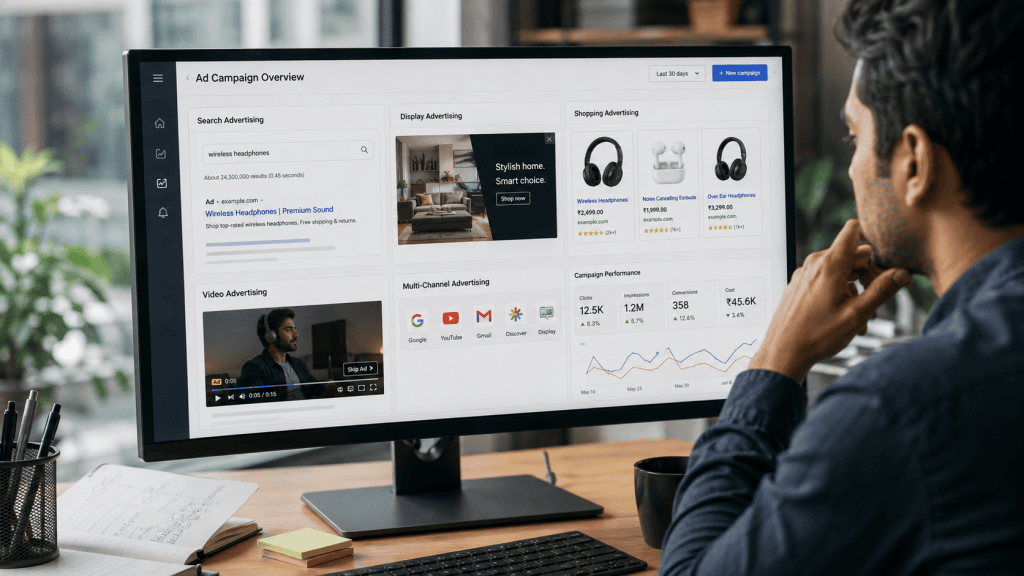
Google Ads offers different campaign types because businesses have different marketing goals. A local service provider may want phone calls, while an online store may want product sales.
1. Search Campaigns
Search campaigns display text-based advertisements when users search for relevant terms on Google.
They are particularly useful for businesses that want to generate website visits, leads, phone calls, bookings, or sales from users who are actively searching for their offerings.
For example, a user searching for “digital marketing agency near me” may see advertisements from businesses offering digital marketing services.
2. Display Campaigns
Display campaigns can show visual advertisements across websites, apps, and other placements within Google’s advertising ecosystem.
They can be useful for building awareness, reaching relevant audiences, and remarketing to people who have previously interacted with a business.
3. Shopping Campaigns
Shopping campaigns are designed primarily for businesses that sell products online. Product advertisements can include information such as the product image, title, price, and store name.
For eCommerce businesses, Shopping campaigns can help potential customers compare products before visiting an online store.
4. Video Campaigns
Video campaigns allow businesses to advertise through video placements, including YouTube.
Video advertising can be useful for brand awareness, product demonstrations, educational content, and reaching audiences who are more likely to engage with visual content.
5. Performance Max Campaigns
Performance Max is a goal-based campaign type that can access multiple Google advertising channels through a single campaign.
Google’s automated systems use machine learning and the information provided by the advertiser to help find potential customers across eligible placements.
Performance Max can be powerful, but beginners should still understand their conversion goals, audience signals, creative assets, product or service information, and tracking setup before relying heavily on automation.
How to Create Your First Google Ads Campaign
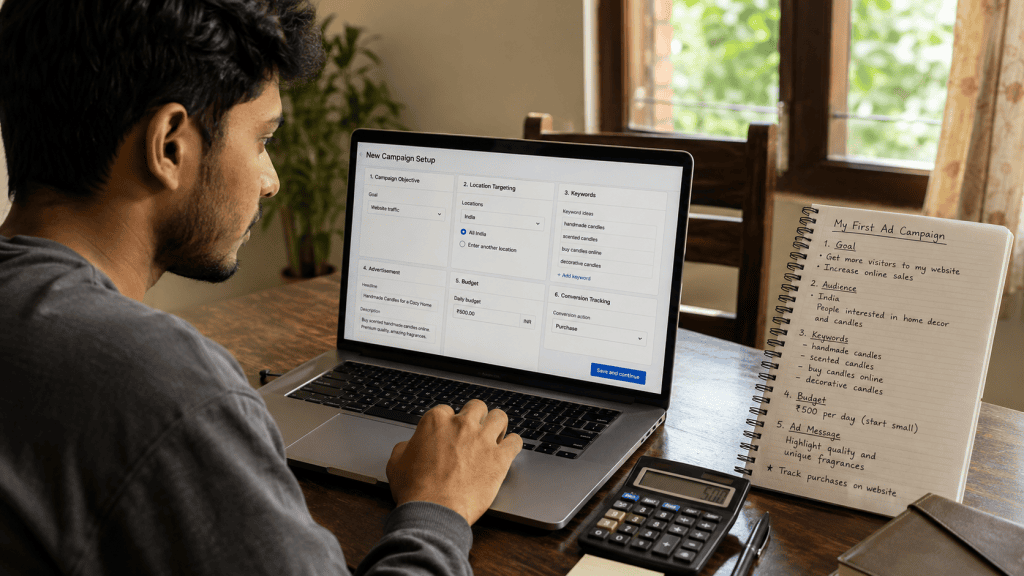
Creating a Google Ads campaign becomes much easier when you approach it step by step. Before spending money, take some time to understand what you want the campaign to achieve.
Step 1: Create or Access Your Google Ads Account
Start by signing in to Google Ads with a Google account and completing the account setup process.
During setup, you may be asked about your business, advertising objective, website, location, and other campaign information.
Step 2: Define Your Campaign Goal
Before choosing keywords or writing advertisements, decide what success means for your campaign.
Your goal could be:
- Generating leads
- Increasing online sales
- Receiving phone calls
- Getting website visits
- Generating bookings or enquiries
- Promoting an app
- Increasing brand awareness
A clear goal makes it easier to choose the right campaign type, bidding approach, landing page, and conversion measurement.
Step 3: Research Relevant Keywords
Keyword research is one of the most important parts of a Search campaign.
Think about the words and phrases your potential customers would actually type into Google when looking for your product or service.
For example, a website development business might consider searches such as “website development services,” “WordPress website developer,” or “website developer for small business.”
Do not select keywords simply because they have high search volume. A keyword can generate thousands of searches and still be a poor choice if those users are unlikely to become customers.
Step 4: Organize Your Keywords
Try to group closely related keywords into logical ad groups or campaign structures.
This makes it easier to write advertisements that closely match what users are searching for.
A campaign promoting SEO services, for example, should not necessarily place every digital marketing keyword into one large group. More focused structures can make your advertisements and landing pages more relevant.
Step 5: Write Relevant Advertisements
Your advertisement should quickly communicate what you offer and why someone should consider your business.
A useful advertisement usually focuses on the customer’s need rather than simply listing company features.
For example, instead of writing a generic headline such as “Our Company Provides Services,” a more useful approach could communicate the actual service and its benefit, such as “Professional WordPress Website Services.”
Keep your claims accurate. Avoid exaggerated promises, misleading offers, or statements that you cannot support.
Step 6: Create a Strong Landing Page
When someone clicks your advertisement, they should arrive on a page that clearly matches what the advertisement promised.
If your advertisement promotes WordPress website development, sending users to a relevant website development service page is usually more useful than sending them to a generic homepage.
Your landing page should be easy to understand, mobile-friendly, reasonably fast, and focused on helping the visitor take the next step.
Step 7: Set Your Budget
Choose a budget that your business can comfortably afford while you learn how the campaign performs.
Beginners should avoid spending a large amount of money simply because they expect immediate sales.
Start with a controlled budget, collect useful data, identify problems, and gradually make informed changes.
Step 8: Configure Conversion Tracking
Conversion tracking is essential if your goal is leads, sales, calls, registrations, or another meaningful action.
Clicks and impressions tell you how many people interacted with your advertisements, but conversions help you understand whether those interactions produced business results.
Depending on your setup, conversions may include form submissions, purchases, phone calls, bookings, or other valuable actions.
Step 9: Review and Launch the Campaign
Before launching, check your keywords, advertisements, landing page URLs, location targeting, budget, conversion tracking, and other campaign settings.
Once everything looks correct, submit the campaign for review and wait for it to become eligible to serve.
Understanding Google Ads Keywords
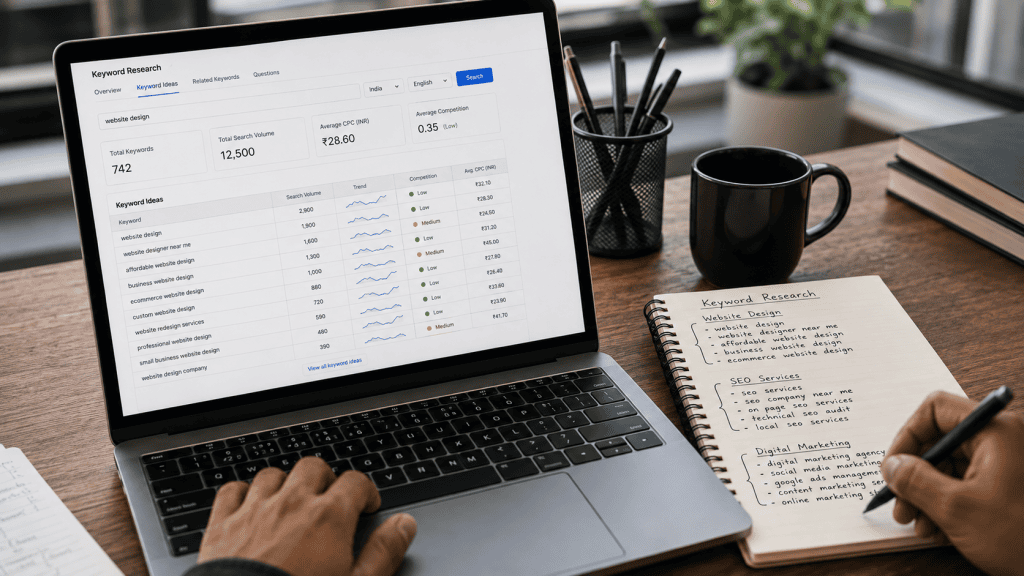
Keywords connect what people search for with the advertisements you create. However, choosing keywords is not simply about finding the most popular terms.
You need to understand the intention behind a search.
Informational Intent
Someone searching “what is SEO” is probably looking for information rather than immediately trying to purchase an SEO service.
Commercial Intent
A search such as “best SEO tools for small business” may indicate that the person is researching solutions and comparing options.
Transactional Intent
A search such as “hire SEO agency” or “buy running shoes online” can indicate a stronger intention to take a commercial action.
Understanding search intent helps you decide which keywords deserve advertising budget and which ones may be better suited to informational content and SEO.
What Are Negative Keywords?
Negative keywords help prevent your advertisements from appearing for searches that are not relevant to your business.
Suppose you sell professional website development services but do not provide free website development. Searches containing terms such as “free” may generate visitors who are unlikely to become customers.
Adding appropriate negative keywords can help reduce irrelevant traffic and protect your advertising budget.
Negative keyword management should be based on actual search-term data whenever possible rather than assumptions alone.
Google Ads Budget: How Much Should a Beginner Spend?
There is no single Google Ads budget that works for every business.
The right amount depends on factors such as your industry, competition, location, average customer value, conversion rate, and advertising goals.
A beginner should think of the initial budget as a controlled learning investment rather than a guarantee of immediate profit.
Start small enough that you can comfortably evaluate the results. Once you understand which keywords, advertisements, audiences, and landing pages are producing useful conversions, you can decide whether increasing the budget makes financial sense.
Important Google Ads Metrics Beginners Should Understand

Google Ads provides a large amount of performance data. You do not need to understand every metric on your first day, but a few are particularly important.
Impressions
Impressions represent how often your advertisement was shown.
Clicks
Clicks indicate how many times users interacted with your advertisement by clicking it.
Click-Through Rate (CTR)
CTR shows how frequently people clicked your advertisement after seeing it. A relevant advertisement can often attract more qualified clicks than a generic one.
Cost Per Click (CPC)
CPC represents the cost associated with clicks on your advertisements, depending on the applicable Google Ads pricing and bidding system.
Conversions
Conversions represent valuable actions that you have configured Google Ads to measure, such as purchases, leads, calls, or registrations.
Conversion Rate
Conversion rate helps you understand how frequently clicks result in a tracked conversion.
Cost Per Conversion
This metric helps you understand how much advertising spend is associated with generating a conversion.
Looking at these metrics together is usually more useful than judging a campaign using a single number.
Common Google Ads Mistakes Beginners Make
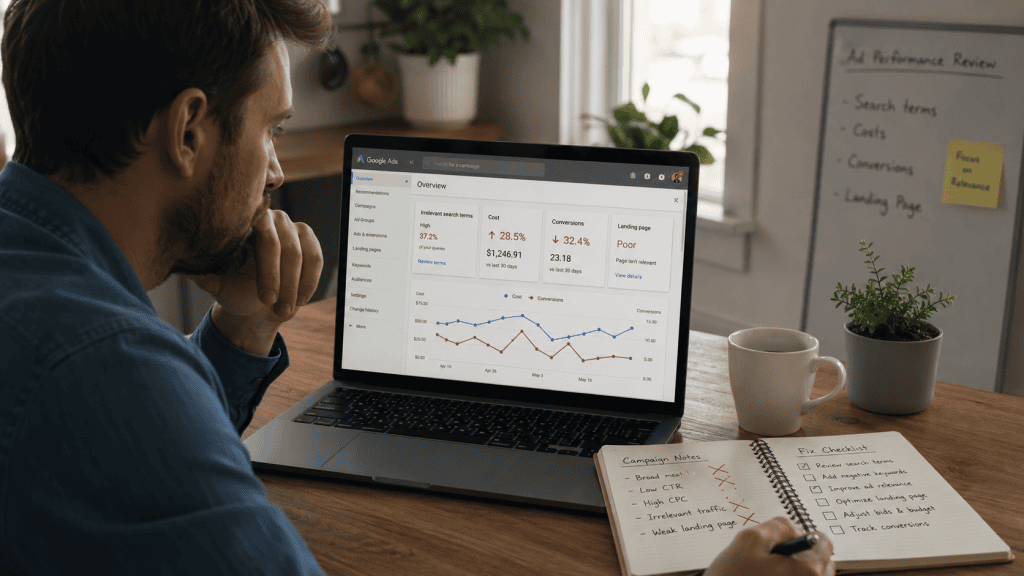
Many Google Ads campaigns fail not because advertising itself does not work, but because basic problems are left unresolved.
Using Extremely Broad Keywords
Very broad keywords can attract users who are interested in something different from what you sell. This can increase costs without producing meaningful business results.
Sending Every Visitor to the Homepage
Your homepage may not be the best destination for every advertisement. A dedicated landing page that directly addresses the user’s search can provide a clearer experience.
Ignoring Search Terms
Reviewing search-term data can reveal irrelevant searches that triggered your advertisements. These insights can help you improve keyword targeting and identify negative keywords.
Not Tracking Conversions
Without reliable conversion tracking, you may see clicks and traffic but still have no clear idea whether your campaign is generating business value.
Changing Campaigns Too Frequently
Constantly changing keywords, budgets, advertisements, and bidding settings can make it difficult to understand what is actually working.
Make changes for a clear reason and give the campaign enough time to collect useful data, while still responding quickly to serious problems.
Ignoring Mobile Users
A large number of searches happen on mobile devices. If your website is difficult to navigate on a phone, advertising traffic can be wasted even when the advertisement itself is good.
How to Improve Google Ads Performance
Successful Google Ads management is an ongoing process. A campaign should be reviewed regularly instead of being launched and forgotten.
Improve Keyword Relevance
Focus your campaign around searches that have a realistic connection to your products or services. Remove or restrict terms that repeatedly generate irrelevant traffic.
Improve Your Advertisements
Test different messages while keeping them relevant to the searcher’s needs. Highlight genuine benefits, useful features, unique selling points, or clear next steps.
Improve Your Landing Pages
Make sure the landing page delivers what the advertisement promised. Use clear headings, concise information, visible calls to action, trustworthy information, and a mobile-friendly layout.
Monitor Search-Term Data
Actual search queries can provide valuable information about what potential customers are looking for. Use these insights to refine your targeting and content.
Test Before Scaling
Do not increase your advertising budget simply because impressions and clicks are increasing. Scale campaigns when the underlying business results justify additional spending.
Google Ads vs SEO: Which One Is Better?

Google Ads and SEO serve different purposes, so choosing one as an absolute replacement for the other is usually not the best approach.
Google Ads can provide paid visibility and targeted traffic without waiting for a page to earn organic rankings.
focuses on improving a website’s organic visibility through useful content, technical improvements, relevance, authority, and a strong overall user experience.
SEO can take considerable time to develop, but successful organic visibility can continue generating traffic without paying for every individual click.
Google Ads can be useful when a business needs faster visibility or wants to test demand for specific products and services.
For many businesses, the strongest long-term approach is to use both. Paid campaigns can generate immediate opportunities and valuable search insights, while SEO can build sustainable organic visibility over time.
Google Ads and Landing Page Quality
Your advertisement is only the beginning of the customer journey.
Imagine someone clicks an advertisement promising affordable website design, but the landing page takes a long time to load, does not mention website design, and provides no clear way to contact the business.
Even if the advertisement attracted the right person, the landing page can lose the opportunity.
A good landing page should answer three basic questions quickly:
- What does this business offer?
- Why should I consider this offer?
- What should I do next?
Improving these elements can help create a more consistent experience between the search query, advertisement, and website.
How Long Does It Take to See Results from Google Ads?
Google Ads can begin generating impressions and clicks relatively quickly after a campaign becomes eligible to serve, but meaningful business results are not guaranteed immediately.
The time required to evaluate a campaign depends on factors such as search volume, budget, competition, conversion volume, product or service demand, and the quality of your campaign setup.
Instead of asking only how quickly you can get clicks, focus on whether those clicks are producing useful actions.
A campaign receiving hundreds of low-quality visits may be less valuable than a smaller campaign generating a consistent number of qualified leads.
Is Google Ads Worth It for Small Businesses?
Google Ads can be useful for small businesses, especially when their products or services have clear search demand.
A local service provider, for example, may benefit from appearing when potential customers search for services in their area. An online store may use advertising to promote products that people are already searching for.
However, a small budget does not automatically guarantee success. Smaller businesses need to be particularly careful about targeting, landing pages, conversion tracking, and cost per acquisition.
The goal should not simply be to spend less. The goal should be to spend intelligently on traffic that has a reasonable chance of producing business value.
Google Ads Checklist for Beginners
Before launching your first campaign, use this simple checklist:
- Define one clear campaign objective.
- Research relevant keywords and search intent.
- Organize related keywords logically.
- Create advertisements that closely match the keywords.
- Use accurate and useful ad copy.
- Send visitors to a relevant landing page.
- Make sure the website works properly on mobile devices.
- Set a realistic starting budget.
- Configure conversion tracking.
- Review search-term data regularly.
- Add relevant negative keywords.
- Monitor conversions rather than clicks alone.
- Test improvements gradually.
- Scale only after the campaign demonstrates meaningful results.
Final Thoughts

Google Ads can be one of the most effective ways for a business to reach people who are actively searching for its products or services. But successful advertising is not simply about choosing a keyword, setting a budget, and waiting for customers.
The strongest campaigns are built around relevance. The keyword should match the user’s search, the advertisement should address that search, and the landing page should deliver what the advertisement promised.
If you are completely new to Google Ads, start with the fundamentals. Learn how keyword targeting works, understand search intent, create focused advertisements, build useful landing pages, and configure conversion tracking before increasing your budget.
Do not be discouraged if your first campaign does not perform perfectly. Advertising data can teach you which searches attract the right audience, which messages generate engagement, and which parts of your website need improvement.
Over time, consistent testing and optimization can turn a basic campaign into a much more effective customer acquisition channel.
This guide covers the essential concepts you need to understand before running Google Ads. Once you are comfortable with the basics, the next step is learning advanced techniques such as keyword match types, negative keyword strategies, bidding strategies, Quality Score, conversion tracking, remarketing, Performance Max optimization, Shopping Ads, audience targeting, A/B testing, and campaign optimization.
For those topics, continue with our Detailed Google Ads Guide, where each concept can be explored with practical examples and more advanced campaign strategies.
Frequently Asked Questions About Google Ads
What is Google Ads?
Google Ads is Google’s online advertising platform that allows businesses to promote products, services, websites, apps, and other offerings across Google’s advertising network.
Is Google Ads free?
No. Creating a Google Ads account does not require you to pay simply for having an account, but running advertisements requires an advertising budget. The actual cost depends on factors such as competition, targeting, bidding, campaign type, and user interactions.
How much should a beginner spend on Google Ads?
There is no universal starting budget. A beginner should choose an amount that the business can afford to test and learn from without creating financial pressure. The appropriate budget depends on the industry, location, competition, customer value, and campaign objective.
Can Google Ads help a new website?
Yes. Google Ads can provide paid visibility while a new website is still building its organic presence. However, advertising traffic will only be useful if the website provides a good experience and offers a relevant solution to visitors.
Is Google Ads better than SEO?
Neither is universally better. Google Ads can provide paid visibility and faster traffic, while SEO focuses on long-term organic visibility. Many businesses use both strategies together.
Can I run Google Ads with a small budget?
Yes, but targeting becomes especially important when your budget is limited. Focus on relevant searches, avoid unnecessary traffic, track conversions, and optimize based on actual campaign data.